
Smart & Contextual Case Views for Support Agents
I led the redesign of IBM’s internal support system (Cognitive Support Platform) so that teams only see the information they actually need, tailored to their role and type of case. By researching how support agents work across 7+ business units worldwide, I created smarter, dynamic layouts that help them solve customer problems faster and with less frustration.
To honor my NDA, I’ve kept this case study free of confidential info. Designs are my own recreations using public design systems, and don’t reflect IBM’s views.
Role
UX/UI Designer
Team
IBM, CIO Design
Timeline
2024 - 2025
Disciplines
UX/UI Design, Product Design, UX Research
Inside the Agent Experience
"I spend more time figuring out what not to look at then actually resolving the case."
I heard this quote early in the research phase from a technical support lead in Europe, and it echoed across regions, roles, and teams during the rest of my research. IBM’s Cognitive Support Platform (CSP) is used by support agents worldwide to manage millions of customer cases each year. However, the existing case view for agents presented the same dense layout for everyone, regardless of their team, expertise, or the type of case. As a result, agents often had to sift through irrelevant information to find what they needed, leading to slower resolutions and growing frustration.
The Opportunity
With CSP serving as the backbone for case resolution at IBM, even small changes had the potential for massive impact. Our goal was to redesign the core case view so that agents only saw the information relevant to them, making their experience faster, simpler, and more human.
This meant shifting from a static, universal layout to something more intelligent, flexible, and adaptive.
My Role
As the lead UX designer during the discovery and early design phases, I was responsible for:
- Leading design workshops and global user research across business units
- Synthesizing insights from over 50 support agents and leaders
- Delivering wireframes and a scalable interface strategy
- Collaborating on implementation recommendations using Salesforce Dynamic Forms
Discovery Across Borders
To fully understand the workflow and pain points of users, I interviewed 50+ support agents and leaders from North America, South America, Europe, and Asia, spanning 7+ different business units within IBM Support. I worked very closely with a product owner of CSP platform to organize this design initiative. We captured diverse workflows from hardware specialists, control center agents, software agents, and other relevant stakeholders in support and mapped out what information they need.
Through these conversations, we focused on what information agents currently see, what they ignore, what they wish they had, and how they prefer information to be organized. From this, we co-mapped role-specific layout requirements: which fields were essential, which could be removed, and how content should be grouped. These insights directly informed a set of ideal, context-aware layouts tailored by both case type and agent role.
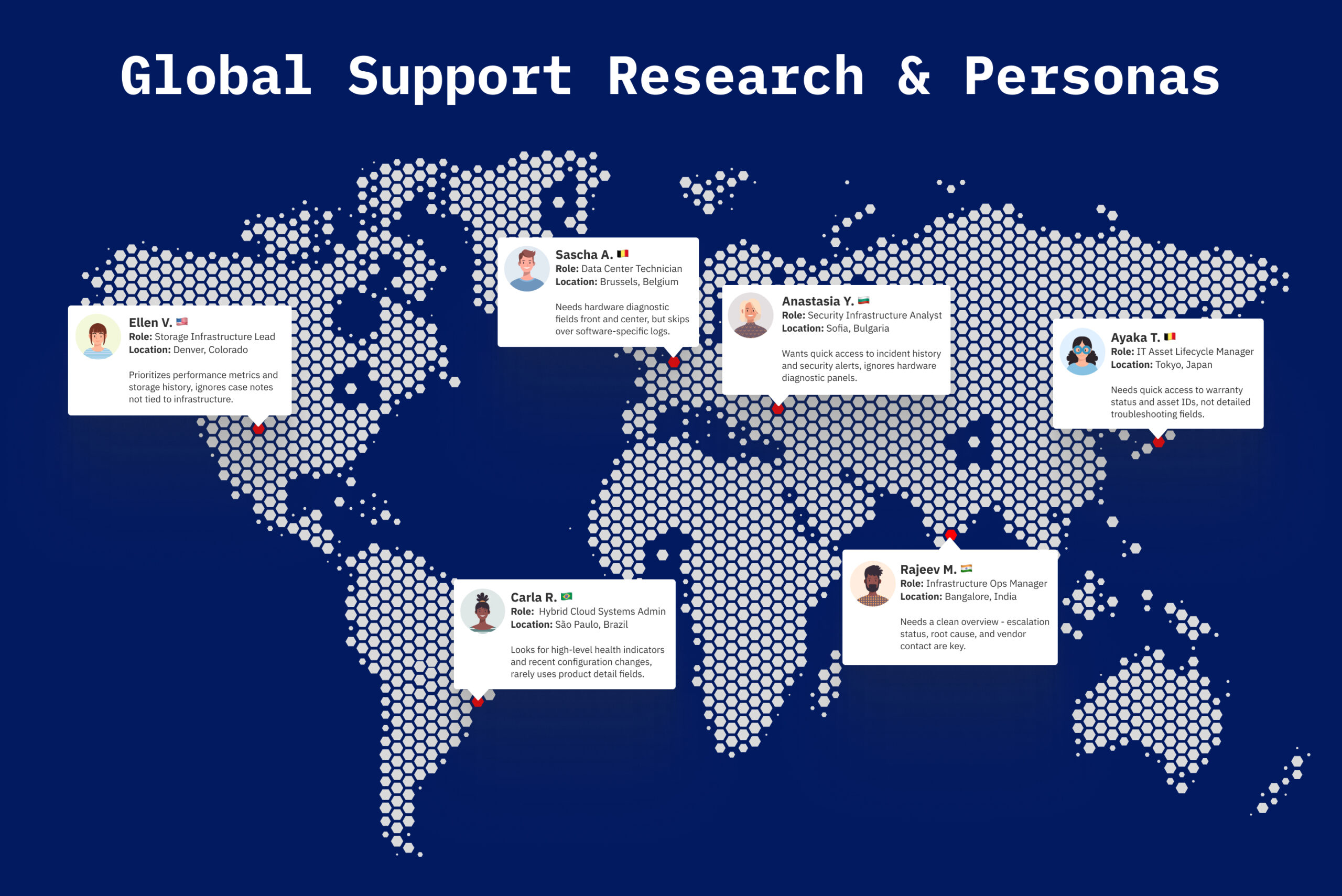
Interviews with 50+ support agents across 7+ business units revealed how role, region, and workflow complexity influence what information agents actually need - and especially what they ignore - when they look at a case.
Key Insights
- Despite their differences, agents shared a core frustration: there was a lot of irrelevant information and had no control over what they saw.
- Time-sensitive cases suffered from poor layout hierarchy - agents had to sift through information in order to grasp the context of the case
- Some fields of information were useful to one team and totally useless to another
"As someone who works on hardware cases, I don't need to see certain information that is only relevant to software cases. It just crowds the screen."
- Quote from a hardware support lead agent
Designing for Context
I worked with a product owner of IBM's Cognitive Support Platform to move forward with designing for a modular, context-based layout strategy. Rather than showing every possible field, the new interface would dynamically surface only the most relevant modules for each case. Each layout would adapt based on an agent’s role or team and type of case (hardware case, generic software case, an escalation case, etc.).
To operationalize this logic, we collaborated with engineering to explore how we could utilize the Salesforce Dynamic Forms feature and implement it into the platform. This feature was relatively new, and to implement it at such a large scale for IBM support meant high visibility and pressure to ensure a seamless, scalable solution.
Dynamic Forms gave us the flexibility we needed. Traditionally, Salesforce layouts are static: they show the same massive set of fields to everyone, often resulting in cluttered, monolithic interfaces. With Dynamic Forms, we could break the layout into individual fields and sections, placing them wherever made sense - including tabs, accordions, and conditional containers. Most importantly, we could apply visibility rules to dynamically show or hide modules based on role, region, or case metadata, which is exactly what our research showed agents needed.
This approach allowed us to design smarter, leaner interfaces that felt personalized without needing custom pages for every user type.
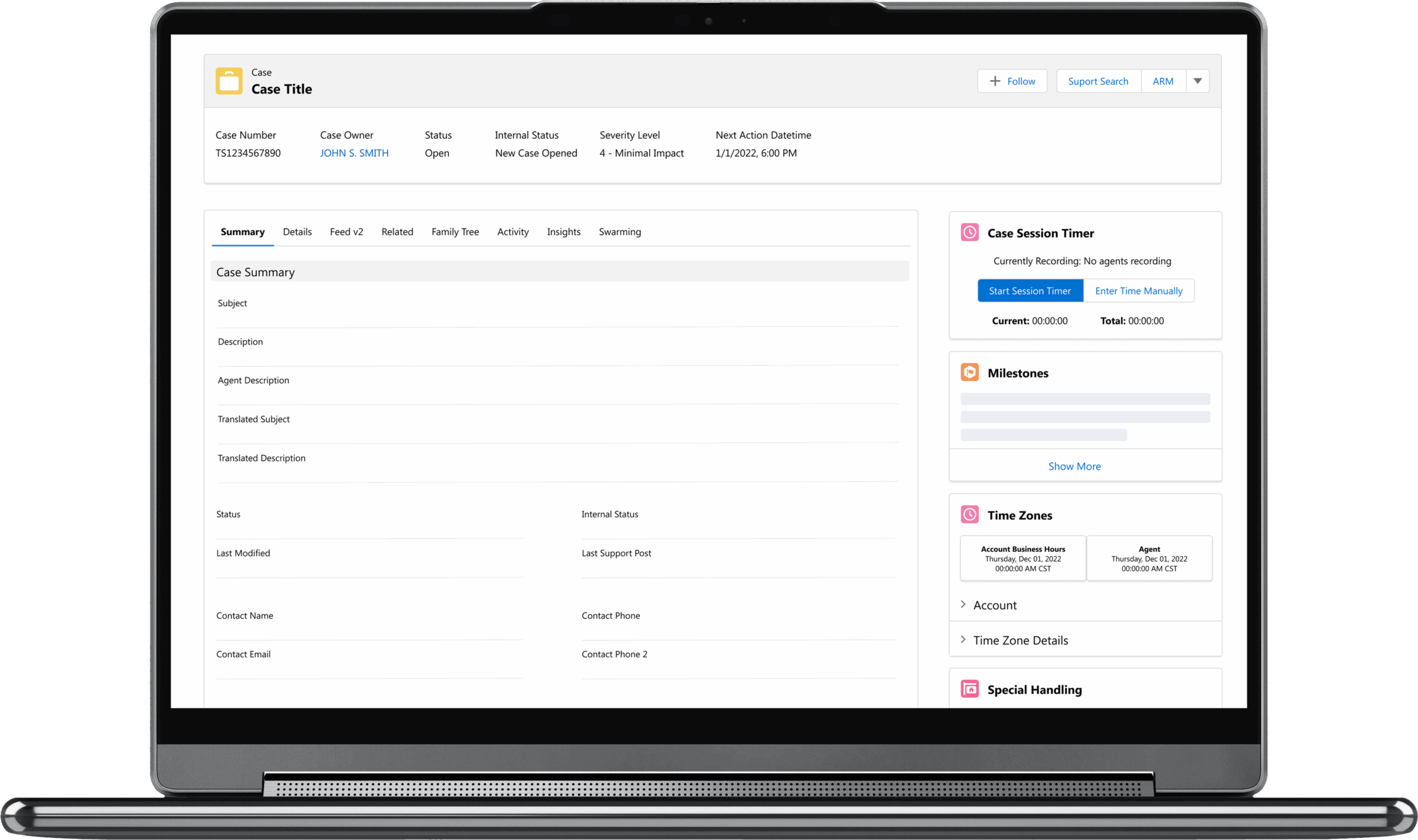
This screenshot shows an example of what a remote technical support engineer might see when handling a software-related case. The layout has been customized to only display the most relevant information, helping them focus and resolve the issue faster.
Aligning the Organization
To ensure our vision could scale, I ran several cross-functional workshops with stakeholders within technical support, engineers, and product owners. Based on hours of research and discussion, I was able to design a total of 10 different case layouts on wireframes based on the information gathered and socialize them to make sure everyone involved was aligned. This intiative took about 6 months to complete.
Results
Through in-depth research with over 50 support agents spanning 7+ business units worldwide, I surfaced patterns of frustration with IBM’s one-size-fits-all case layout. These conversations revealed a clear opportunity: agents didn’t need more information - they needed the right information.
Guided by those insights, I shaped a layout strategy that responded to the context of each case and the unique needs of each agent. Working closely with engineering, we explored how to implement this adaptability using Salesforce Dynamic Forms - a flexible framework that allowed us to conditionally show or hide fields based on role and case type.
I delivered annotated wireframes and clear design principles that gave product and engineering teams a shared vision to move forward with.
Case layouts remain a constantly evolving topic within IBM Support, but this work laid the groundwork for a more streamlined, intelligent experience. Although I transitioned off the project after the initial massive phase, my work became the foundation for a more focused, intelligent case experience - one now being adopted across IBM’s internal support ecosystem.